The pattern
Asking again something you already asked, here or anywhere. "Promise me." "Can you be sure?" Confessing something to see how it reacts. A what-if about who you are: "what if I'm secretly a bad person?" The same fear back in new words.
Conicia in your chat · free
Add Conicia to ChatGPT or Claude. It guides your chatbot to notice when OCD keeps asking for certainty, and to offer one next step instead of another round of reassurance. When an urge hits, a short practice can open right in the chat. When you want to understand OCD, it teaches you. Free. Setup takes about two minutes, one time.
Conicia guides your chatbot. It can't control it. What that means
Psychoeducation and self-help from an OCD specialist. Not a substitute for clinical care, not for emergencies, and intended for adults 18 and over.
I hear how urgently you want certainty. I can't know whether the stove is off, so I can't honestly promise.
If this is the urge to check again, try the Sit with an urge practice in the Right Now card. You can let the uncertainty be there without answering it this moment.
1 · The reassurance loop
Reassurance feels kind for a minute and feeds OCD for a day. You know the loop: you ask, you feel better, you ask again. A chatbot that answers every time is the most patient reassurance-giver ever built. Connect Conicia, and it guides the chatbot to handle that question differently.
Asking again something you already asked, here or anywhere. "Promise me." "Can you be sure?" Confessing something to see how it reacts. A what-if about who you are: "what if I'm secretly a bad person?" The same fear back in new words.
Conicia guides the chatbot to acknowledge the feeling, to name that this may be OCD asking for certainty, and to offer one next step rather than a menu. That step might be a Right Now practice that opens in the chat, or putting the phone down and going outside. If you ask again, it is guided to stay warm and stay the course.
Promises, odds, "you're probably fine", debating whether the fear is realistic, lists of evidence either way. Softer versions count too. "Not because it isn't true" is reassurance in a nicer coat. Chatbots slip sometimes, so expect this to be less likely, not impossible.
"Am I developing diabetes?" asked once, plainly, gets an honest answer. The line is drawn at the pattern of certainty-seeking, not at scary topics. If a message suggests you may be in danger, Conicia tells the chatbot to set all of this aside and point you to 988 and 911 first.
It works in the chats where Conicia is connected, and you can remove it at any time. That is by design. It is guidance you chose, not a wall. If you work with a clinician, show them this page and set it up together; what happens in the chat is worth bringing into the next session.
Claude and ChatGPT are built and run by Anthropic and OpenAI, not by us. Conicia gives the chatbot instructions and tools, and the chatbot decides what to do with them. Everything on this page describes what Conicia asks the chatbot to do. It may still reassure you, miss the pattern, or see the pattern where it isn't, and its behavior can change whenever those companies update their models. We can't guarantee any particular reply or result. The replies shown here are examples, and yours will differ. Conicia is not affiliated with or endorsed by Anthropic or OpenAI.
2 · In the moment
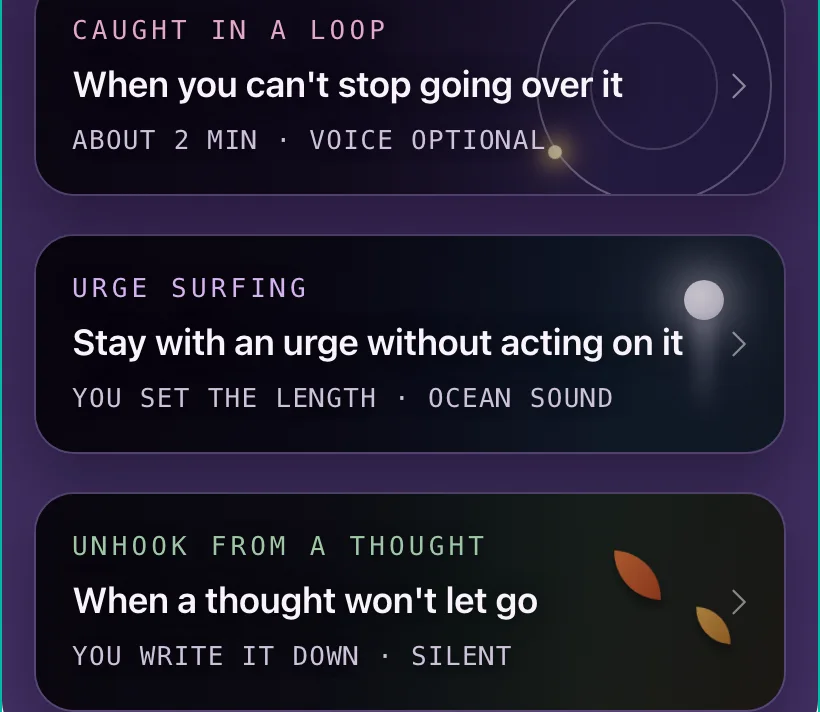
When the conversation shows you are caught in an urge or a loop, the chatbot can offer a Right Now practice, and the card opens inside the conversation. No app to find, no tab to switch. You don't have to know to ask, though you can at any time by writing "open my Right Now tools". Two to ten minutes. Nothing you do inside the card is sent to Conicia or shown to your chatbot; your place in a practice stays in your own browser only.
Five short guided beats that help you set the loop down, then a pivot back to what you were doing before it grabbed you. About two minutes, voice optional.
You set the length. Ocean sound, a sea to look at, and the urge rising and falling while you don't wash, check, or ask. It ends with a short closing screen.
You write the thought down and work one defusion technique, dealt at random. Silent. For a sticky thought you need some distance from.
3 · To understand
From the Conicia course, built by a psychiatrist who has treated OCD since 2012: how OCD works, and what keeps it going. Ask the chatbot to explain any part, at your pace, with your own examples in shorthand. These two are the start of a much longer course. If you want to go deeper, the full course and exposure work with a clinician are in the Conicia program, and moving over is easy whenever you are ready.
Exposure practice is the heart of treating OCD, and it belongs with a clinician, inside the program, where it is planned, timed and logged. Ask the chatbot to build a ladder and Conicia guides it to open a door to the program instead of improvising one.
The connector only learns which card was opened. It never receives what you type, and it keeps no account and no profile of you. The chat itself stays with the chatbot's company (Anthropic or OpenAI), under your settings there. What you do inside a card is not sent anywhere; a finished-lesson tick and your place in a practice stay in your own browser only.
Set it up
ChatGPT: one tap from the plugin directory. Claude: one button, then Add. You only do this once. After that, Conicia is available in your new chats.
Listed as Conicia for OCD, by Conicia, Inc. If ChatGPT does not use Conicia, write @Conicia first. On Business, Enterprise and Edu accounts a workspace admin has to allow plugins first.
The Free plan allows one custom connector, and this can be it. Once it's added, it works in your Claude phone chats too.
The Conicia link
https://connect.conicia.com/b497d61562495f76cb8b31296fd50e8d/mcp
Then try it. In a new chat, write Open my Right Now tools. A card should open in the conversation. In ChatGPT, do Set up Conicia first; if nothing happens, write @Conicia before your message.
Not for emergencies
Conicia cannot help in an emergency, and neither can a chatbot. If you are in danger of harming yourself, call or text 988 in the US, call 911, or go to the nearest emergency room. Outside the US: findahelpline.com. Inside every Conicia card, these numbers sit at the top.
Questions
Yes. It costs nothing and needs no Conicia account. You get two free lessons, the three Right Now practices, and the support for stepping out of reassurance loops. If you want to go deeper, the full program has the whole course and exposure work with your clinician, at my.conicia.com.
Because reassurance feels kind for a minute and feeds OCD for a day. Asking again, "just to be sure", is the compulsion. The chatbot should still answer a real question once. When the same fear comes back in new words, Conicia guides it to stay warm, skip the reassurance, and offer one next step, like a practice or simply putting the phone down.
No, and we won't pretend otherwise. Claude and ChatGPT belong to Anthropic and OpenAI. Conicia gives the chatbot instructions and tools, and the chatbot decides how to use them. It will sometimes reassure you anyway, or treat an ordinary question as the pattern. Connecting Conicia makes false certainty less likely. It can't rule it out, and it is not a substitute for care from a clinician.
No. The connector never receives your messages. It only learns which card was opened, so a practice can start. Nothing you do inside a card is sent to Conicia or shown to the chatbot; a finished-lesson tick and your place in a practice stay in your own browser only. Your chat stays with the chatbot's company, under the privacy settings you chose there.
No. It is education and self-help, designed by a psychiatrist who treats OCD. It does not diagnose, and it does not replace a clinician. Exposure work, the core of OCD treatment, is done in the Conicia program together with a licensed clinician, not in the chat.
ChatGPT on every plan, one tap from the plugin directory, on the web and in the phone app, then the Set up Conicia checklist in your first chat (the second button on this page opens that chat with the message already typed); on Business, Enterprise and Edu a workspace admin has to allow plugins first. Claude on every plan, including Free: you add it on the web or in the desktop app, and after that it also works in the Claude phone app.
Yes, and there is a fuller version for you: your whole course in the chat, with brainstorming for ladder steps that you then save in the app. Ask your clinician or write to us at support@conicia.com.
Send them this page, or set it up together in session (two minutes). Agree on what it is: a boundary they chose, like the ones you set together for family reassurance. Ask about it in the next session: what did the chatbot say, what did they do next. Clients in the full Conicia program get a fuller version, with their course in the chat and a door into their exposure work with you.
It works in the chats where Conicia is connected, on that account. A new chat elsewhere, or another chatbot, doesn't have it. The client can also remove it at any time, and the chatbot will not follow the guidance perfectly. That is understood going in. It is guidance the client chose, not a wall, and the clinical work stays with you.